My Google Rankings Dropped: What Should I Check First?
Published 20 September 2026
Seeing your Google rankings drop can be worrying.
One day, your website is bringing in calls, enquiries and new customers. Then you check your main keywords and discover that several pages have fallen.
Sometimes the change is small.
Sometimes a page that ranked near the top has disappeared from the first page completely.
The important thing is not to panic and start changing everything at once.
A ranking drop can have many causes. It could be a technical problem. It could be a change to your website. Your competitors may have improved. Search behaviour may have changed. Google may have updated its systems. For a local business, your Google Business Profile and local competitors can also affect what you see.
Google itself recommends investigating the cause before making major changes. Its guidance identifies technical problems, security issues, manual actions, algorithmic changes, seasonality and changing search demand among the reasons search traffic can fall.
This guide explains what to check first, what different types of ranking drops can mean and when it makes sense to bring in a professional local SEO agency or SEO specialist.
First, find out what actually dropped
Before changing your website, establish exactly what has changed.
“Google rankings dropped” can mean several different things.
You might have:
-
Lost rankings for one important keyword.
-
Lost rankings across an entire group of keywords.
-
Lost rankings for one page.
-
Lost rankings across several pages.
-
Lost organic traffic but maintained similar rankings.
-
Lost Google Maps visibility.
-
Lost both organic and local rankings.
-
Lost impressions as well as clicks.
-
Lost clicks while impressions remained relatively stable.
These situations require different investigations.
For example, a drop from position 2 to position 4 is very different from a page falling from position 4 to position 40.
Google specifically advises against making drastic changes because of small ranking fluctuations. A small movement can happen naturally as search results change. A large and sustained decline deserves a much deeper review.
Step 1: Check Google Search Console
Start with Google Search Console.
Do not rely only on manually searching your keywords.
Search results can vary based on location, device, search history and other factors. Your personal Google search is not a reliable way to measure the overall performance of a website.
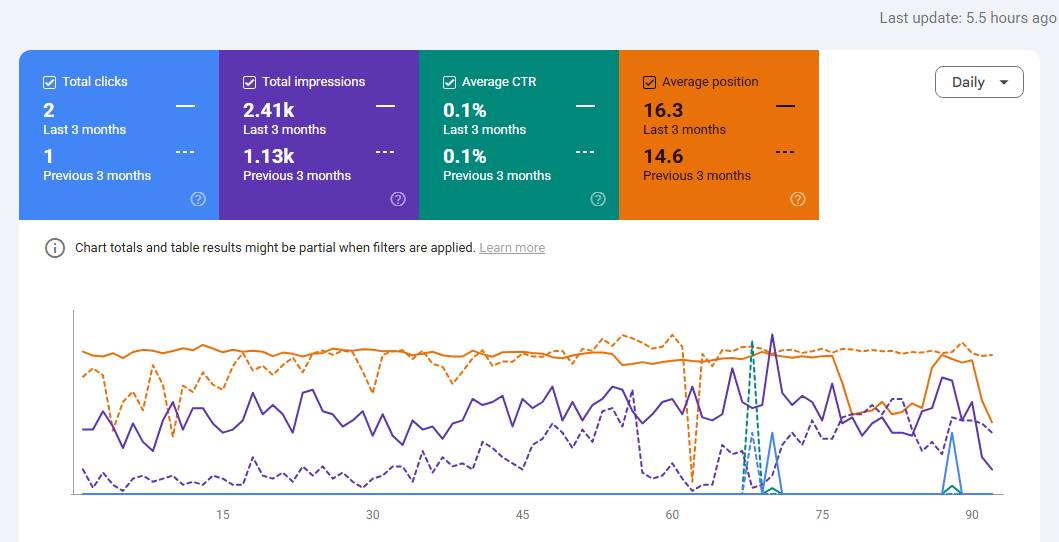
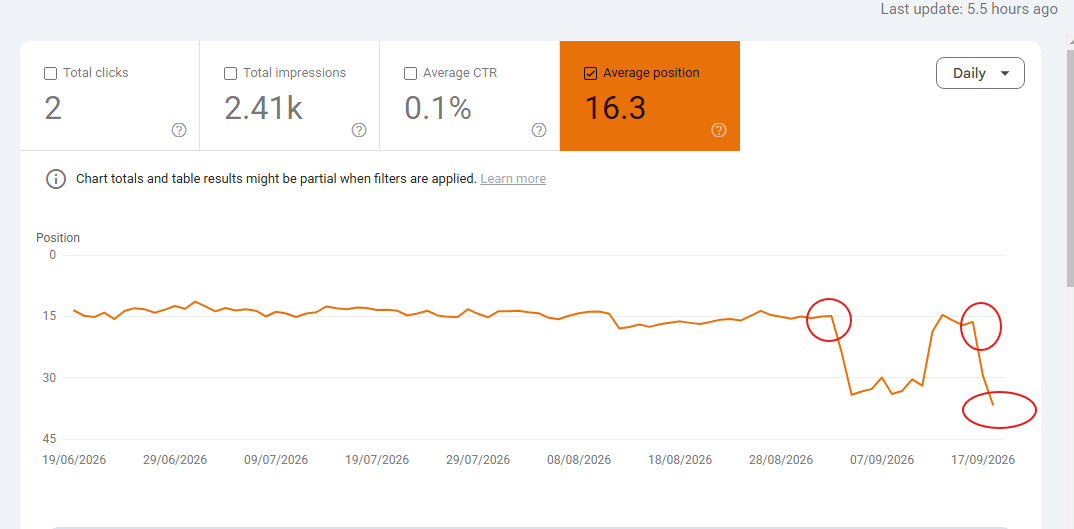
In Search Console, open the Performance report and compare your recent period with an earlier period.
Look at:
-
Total clicks
-
Total impressions
-
Average position
-
Click-through rate
-
Queries
-
Pages
-
Countries
-
Devices
-
Search appearance
The important part is finding the pattern.
Did clicks fall but impressions stay similar?
That could indicate that your average positions or search result appearance changed, or that users are choosing different results.
Did impressions fall as well?
That suggests something broader may have changed.
Perhaps fewer people are searching for those terms. Perhaps your visibility has declined. Perhaps Google is showing your pages less often for those queries.
Did only one page lose traffic?
That points towards a page-level investigation.
Did dozens of important pages fall together?
That deserves a wider technical, content and algorithm investigation.
Google recommends comparing the right periods and breaking performance down by queries and pages rather than looking only at total traffic.
Step 2: Check whether Google had a major update
If your rankings dropped suddenly, check Google's published ranking updates.
Google makes broad changes to its search systems several times a year. These are commonly referred to as core updates.
A core update does not necessarily mean your website has a technical problem or that you have received a penalty.
Google explains that its core updates are broad changes to how its systems assess content. A page can move down because other pages have become more relevant or useful for a particular search.
This distinction matters.
A ranking decline after an update does not automatically mean:
“Google penalised my website.”
That conclusion is often premature.
Instead, compare your pages with the pages now ranking above you.
Ask:
-
What do the new top-ranking pages provide?
-
Are they more specific?
-
Do they answer the searcher's question better?
-
Are they more up to date?
-
Do they demonstrate stronger first-hand experience?
-
Are they better structured?
-
Do they provide useful information that your page does not?
-
Are they more relevant to the search intent?
The goal is not to copy competitors.
It is to understand what has changed in the search results.
Step 3: Check for technical SEO problems
Technical problems can cause serious ranking losses.
A website can look perfectly normal to a customer while giving search engines a very different experience.
Check whether your important pages can still be crawled and indexed.
Check your robots.txt file
Make sure you have not accidentally blocked important sections of the site.
A small change to robots.txt can have a large impact if it prevents search engines from accessing important URLs.
Check your noindex tags
Make sure important pages have not accidentally been given a noindex directive.
This is particularly important after:
-
Website redesigns
-
CMS changes
-
Plugin updates
-
Developer work
-
SEO migrations
-
Staging-site launches
Check canonical tags
Your canonical tags should make sense.
If a page accidentally points its canonical URL somewhere else, Google may choose a different URL to represent that content.
Check for crawl errors
Look through Search Console for indexing and crawling problems.
Pay attention to:
-
Server errors
-
404 errors
-
Redirect problems
-
Indexed pages that have disappeared
-
Pages excluded from indexing
-
Duplicate URLs
-
Redirect chains
-
Soft 404s
Check whether the website is accessible
If your server has experienced downtime or repeated availability problems, investigate when that happened.
A technical SEO audit should not stop at checking whether a website loads in your browser.
You need to understand how Googlebot is able to access and process the site.
Step 4: Look for recent website changes
This is one of the most overlooked checks.
Ask:
What changed shortly before the rankings dropped?
Perhaps someone:
-
Redesigned the website.
-
Changed the URL structure.
-
Deleted pages.
-
Changed page titles.
-
Rewrote important content.
-
Changed internal links.
-
Removed location pages.
-
Changed the navigation.
-
Installed a new SEO plugin.
-
Migrated the website.
-
Changed hosting.
-
Added redirects.
-
Removed old redirects.
-
Changed canonical tags.
-
Edited schema.
-
Published hundreds of new pages.
If the timing lines up, investigate the change before assuming the problem is an algorithm update.
URL changes are particularly important.
Google notes that website moves and URL changes can cause ranking fluctuations while pages are recrawled and reindexed.
Step 5: Check whether important pages were deleted
This deserves its own check.
Businesses sometimes remove old pages because they appear outdated or because someone believes fewer pages will make the website “cleaner”.
That can remove years of accumulated search visibility.
Look at your old URLs.
If an important page was deleted, ask:
-
Did it have organic traffic?
-
Did it have backlinks?
-
Did it rank for valuable searches?
-
Did it attract local customers?
-
Was it replaced with another relevant page?
-
Is the old URL correctly redirected?
Do not redirect every deleted page to the homepage.
A redirect should make sense for the user and the destination page.
Step 6: Check your content
If technical issues are not responsible, examine the content.
Start with the pages that lost the most visibility.
Ask whether the page still satisfies the search intent.
This is more important than simply counting keywords.
For example, imagine someone searches:
“emergency plumber in Manchester”
They probably want to find a plumber who actually provides emergency services in Manchester.
A page that spends 1,500 words discussing plumbing in general may not satisfy that intent as well as a focused page that clearly explains:
-
Where the company operates
-
What emergency services it provides
-
When it is available
-
What customers can expect
-
How to contact the business
-
Relevant experience
-
Areas served
-
Frequently asked questions
The objective is not to make the page longer.
It is to make it more useful.
Step 7: Look for thin or repetitive local pages
This is particularly important for local businesses.
Creating dozens of pages that simply swap one town name for another is not a strong local SEO strategy.
For example:
-
Plumber Manchester
-
Plumber Salford
-
Plumber Stockport
-
Plumber Bolton
-
Plumber Oldham
-
Plumber Rochdale
If every page contains almost identical text, changing only the location name, you should review those pages carefully.
A strong location page should have a genuine reason to exist.
It should provide useful information about the service and the location rather than simply trying to capture another keyword.
Step 8: Check internal links
Internal links help users and search engines discover related pages.
If you recently changed your website structure, you may have accidentally removed important internal links.
Look at your highest-value pages.
Can Google reach them easily from the rest of the site?
Do your important service pages receive relevant internal links?
Do your location pages connect logically with your main service pages?
Internal linking should help explain the structure of your website.
It should not become a collection of links stuffed with exact-match keywords.
Step 9: Check your backlinks and website authority
If a previously strong page suddenly loses visibility, investigate its link profile.
You do not necessarily need thousands of backlinks.
What matters is whether your website has genuine authority and relevant references from other websites.
Look for:
-
Lost high-quality backlinks
-
Important links removed during a redesign
-
Broken backlinks
-
Sudden unnatural link growth
-
Low-quality link campaigns
-
Links pointing to old URLs
-
Competitors gaining relevant links
Do not respond to a ranking drop by buying hundreds of cheap backlinks.
That can create a much bigger problem.
A professional local SEO service should focus on building genuine relevance and authority rather than manufacturing numbers.
Step 10: Check your competitors
This is one of the most valuable parts of a ranking-drop investigation.
Do not only ask: “What did we do wrong?”
Ask: “What changed in the search results?”
Find the pages that now rank above you.
Compare them against yours.
Look at:
-
Content quality
-
Search intent
-
Service coverage
-
Location relevance
-
Page structure
-
Internal links
-
Reviews
-
Local authority
-
Backlinks
-
Business information
-
User experience
-
Brand recognition
You may discover that nothing “broke” on your website.
Your competitors simply became stronger.
Google's search results are not static. Google notes that rankings can change as the web, user expectations and its systems change.
Step 11: If you are a local business, check Google Maps separately
Organic rankings and local rankings are related, but they are not the same thing.
If your business has lost visibility in Google Maps or the local pack, investigate your Google Business Profile separately.
Google says local results are primarily influenced by relevance, distance and prominence.
That means you should review:
-
Primary business category
-
Secondary categories
-
Business name
-
Address
-
Phone number
-
Opening hours
-
Services
-
Business description
-
Reviews
-
Review responses
-
Photos
-
Website URL
-
Local landing pages
-
Business information across the web
Google also uses information from multiple sources when building local business information, including public websites, third-party data, user contributions and business-owner information.
Check your local competitors too
If your Google Business Profile has not changed but your Maps rankings have fallen, look at the businesses now appearing above you.
Are they:
-
More relevant to the search?
-
Closer to the searcher?
-
More established?
-
Receiving more reviews?
-
Building stronger local authority?
-
Providing better information?
Remember that local rankings can vary according to where the search is performed.
A business may rank very well from one part of a city and much lower from another.
That is normal.
Step 12: Check your Google reviews
Reviews are not simply a reputation issue.
They are also part of Google's local ranking system.
Google states that prominence can be influenced by information such as links and reviews, and that more reviews and positive ratings can help a business's local ranking.
Look for changes in:
-
Review volume
-
Review frequency
-
Average rating
-
Recent reviews
-
Competitor review growth
-
Owner responses
But don't buy reviews.
Don't create fake reviews.
Don't ask customers to use unnatural keywords in reviews.
Build a genuine review process around real customers.
Step 13: Check your business information across the web
Local SEO depends partly on consistent business information.
Check your:
-
Business name
-
Address
-
Phone number
-
Website
-
Opening hours
-
Services
across relevant directories and websites.
Google gathers business information from a variety of sources, so accuracy matters beyond your own website and Business Profile.
If your business has moved, changed its phone number or rebranded, make sure important third-party references have been updated.
Step 14: Check for a manual action
A manual action is different from a normal ranking fluctuation.
If Google has taken a manual action against your site, Search Console should provide information about it.
Check:
Search Console -> Manual Actions
Also check the Security Issues report.
Google recommends checking these reports when investigating significant search visibility problems.
Do not assume that every ranking decline is a penalty.
Most ranking drops are not evidence of a manual action.
But checking takes little time, so it should be part of your investigation.
Step 15: Check for security problems
A hacked website can lose visibility and damage customer trust.
Look for:
-
Unauthorised pages
-
Strange redirects
-
Spam pages
-
Suspicious scripts
-
Unexpected users
-
Malware warnings
-
Security notifications in Search Console
If you discover a security problem, deal with it immediately.
SEO work should come after the underlying security issue has been addressed.
Step 16: Check whether search demand changed
Not every traffic decline is an SEO problem.
Sometimes people simply stop searching for something as often.
This can happen because of:
-
Seasonality
-
Economic changes
-
New products
-
Changing consumer behaviour
-
News events
-
Changes in terminology
-
Competitor activity
-
Industry trends
Google recommends using Google Trends alongside Search Console when investigating changes in search demand.
For example, if your impressions fell but searches for the entire service also fell, your website may not be the main cause.
Step 17: Check whether the search results themselves changed
Google can change what it displays for a query.
A traditional organic result might compete with:
-
Local packs
-
Shopping results
-
Images
-
Videos
-
Featured snippets
-
AI-related search features
-
Other search features
This can affect clicks even when your ranking has not changed dramatically.
So do not look at position alone.
Look at the entire search result.
Ask:
What does a customer see when they search this today?
That can tell you more than a ranking report by itself.
Step 18: Do not immediately rewrite everything
This is where many businesses make things worse.
They see rankings fall and immediately:
-
Rewrite every page.
-
Change every title.
-
Add hundreds of keywords.
-
Delete old content.
-
Buy backlinks.
-
Create dozens of location pages.
-
Change their Google Business Profile.
-
Change URLs.
That makes diagnosis much harder.
If you change ten things at once, you will not know which change helped or hurt.
Start with evidence.
Find the affected pages.
Find the affected queries.
Identify when the change happened.
Check technical issues.
Check competitors.
Then make targeted improvements.
A simple Google ranking drop checklist
Before hiring an SEO agency, you can run through this basic checklist:
Search visibility
-
Did organic clicks fall?
-
Did impressions fall?
-
Did average position fall?
-
Which queries lost visibility?
-
Which pages lost visibility?
-
Did the decline affect mobile, desktop or both?
Technical SEO
-
Are important pages indexed?
-
Did the robots.txt file change?
-
Did any important pages receive a noindex tag?
-
Are canonical tags correct?
-
Are there major crawl errors?
-
Are redirects working?
-
Has the website experienced downtime?
-
Did the URL structure change?
Content
-
Did important content recently change?
-
Does the page still match search intent?
-
Is the content genuinely useful?
-
Are location pages substantially different and useful?
-
Are important pages outdated?
-
Have valuable pages been deleted?
Authority
-
Have important backlinks disappeared?
-
Have competitors gained relevant links?
-
Does your website have genuine industry authority?
-
Are there obvious spammy link-building practices?
Local SEO
-
Is your Google Business Profile verified?
-
Is your primary category accurate?
-
Are your services complete?
-
Is your business information accurate?
-
Have reviews changed?
-
Are competitors gaining local visibility?
-
Are important local citations accurate?
-
Has your website changed?
Google issues
-
Is there a manual action?
-
Is there a security issue?
-
Was there a relevant Google update?
-
Did the drop begin before or after the update?
When should you hire a local SEO agency?
If the drop is small and isolated, you may not need professional help.
A small ranking movement can be normal.
But professional help becomes more useful when:
-
Your main service pages have fallen substantially.
-
Organic leads have dropped.
-
Your Google Maps visibility has declined.
-
Several important locations have lost rankings.
-
Your competitors have overtaken you.
-
A website migration caused a major decline.
-
You cannot identify the cause.
-
Your website has accumulated years of SEO work from different providers.
-
You suspect technical or indexing problems.
-
You have lost visibility across a large group of keywords.
A proper local SEO audit should look beyond a handful of keyword positions.
It should connect rankings with pages, technical health, competitors, Google Business Profile performance, local relevance, links and actual business goals.
That is where an experienced local SEO company can add value.
What should a professional SEO audit include?
A useful audit should answer questions.
Not just produce a long PDF.
At minimum, it should investigate:
1. Technical SEO
Can Google crawl, understand and index your important pages?
2. Content
Does each important page satisfy the search intent behind the queries you want to rank for?
3. On-page SEO
Are titles, headings, internal links, structured information and page content helping search engines understand the page?
4. Local SEO
Is your website and Google Business Profile relevant to the locations and services you target?
5. Competitors
What are the businesses currently ranking above you doing differently?
6. Authority
Does your website have relevant and trustworthy signals from other websites?
7. Search Console data
Which pages and queries actually changed?
8. Business results
Are rankings translating into calls, enquiries and customers?
The last point is important.
A ranking report can look impressive while the phone remains quiet.
How long does it take to recover lost Google rankings?
There is no universal recovery time.
It depends on the cause.
A technical problem that prevents indexing may be fixable relatively quickly.
A major content or authority problem can take much longer.
Google explains that some changes can take effect within days, while other improvements can take several months before Google's systems recognise the broader change.
That is why anyone promising an exact recovery date without first diagnosing your website should be treated cautiously.
SEO is not a switch.
The first objective is to identify the problem.
Then you fix it.
Then you monitor the results.
Don't confuse a ranking drop with a failed SEO strategy
A ranking decline does not automatically mean your previous SEO work was useless.
Search results change.
Competitors improve.
Search demand changes.
Google updates its systems.
Websites change.
The important question is not:
“Did my ranking drop?”
It is:
“Why did it drop, and what should we do about it?”
That is the question worth investigating.
If your local rankings have dropped, start with an audit
If your business depends on Google for calls and enquiries, a ranking drop deserves more than a quick keyword search.
You need to understand what changed.
At Prime Local SEO, we focus specifically on local search visibility for UK businesses. That includes Google Maps, Google Business Profile optimisation, local organic rankings, citations, local content and the other factors that influence how customers find a business.
We do not believe in changing everything simply because rankings moved.
We start with the evidence.
We look at where visibility was lost, what changed, what competitors are doing and where the biggest opportunities are.
If you are not sure why your Google rankings have dropped, a local SEO audit is a sensible place to start.
Find the problem first. Then fix the right thing.
Frequently Asked Questions
1. Why did my Google rankings suddenly drop?
A sudden ranking drop can have several causes. Check Google Search Console first, then investigate recent website changes, indexing issues, Google updates, competitors, content changes and search demand. For local businesses, also check Google Maps and your Google Business Profile.
2. How do I find out why my Google ranking dropped?
Start by identifying which pages and search queries lost visibility in Google Search Console. Then compare the timing of the decline with website changes, Google updates and changes in search demand. Comparing your pages with the competitors that replaced them can also reveal what changed.
3. Can a website update cause Google rankings to drop?
Yes. Website redesigns, URL changes, deleted pages, incorrect redirects, changes to internal links, canonical tags and other technical changes can affect search visibility. This is why it is important to compare the timing of a ranking decline with recent website work.
4. Can a Google algorithm update cause rankings to fall?
Yes. Google's search systems are regularly updated. A decline following an update does not automatically mean that your website has been penalised. You should review the pages that lost visibility and compare them with the pages now ranking for the same searches.
5. Why has my Google Maps ranking dropped?
Local rankings can change because of relevance, distance and prominence, as well as changes in competitors and local search results. Check your Google Business Profile, categories, services, reviews, business information and local competitors.
6. How long does it take to recover lost Google rankings?
There is no standard recovery period. The timeframe depends on the cause of the decline. A technical problem may be addressed relatively quickly, while improvements involving content, authority and overall relevance can take much longer.
7. Should I change my website if my rankings drop?
Not immediately. First identify the cause. Changing large parts of the website without understanding the problem can make the situation harder to diagnose. Use Search Console and other evidence to identify the pages, queries and issues involved before making significant changes.
8. Do lost backlinks cause Google rankings to drop?
They can contribute to a decline, particularly when an important page loses relevant, authoritative links. However, backlinks are only one part of SEO. A proper investigation should also consider technical SEO, content, search intent, competitors and changes in Google's search results.
9. Should I hire an SEO agency if my rankings have dropped?
It depends on the size and cause of the decline. If one keyword has moved a few positions, professional help may not be necessary. If important pages, local rankings or business enquiries have declined significantly and you cannot identify why, a professional SEO audit can provide a more detailed diagnosis.
10. What should a local SEO audit check after a ranking drop?
A thorough audit should examine technical SEO, indexing, content, search intent, internal links, backlinks, competitors, Google Business Profile optimisation, reviews, local business information and historical Search Console data. The goal should be to identify the cause of the decline and prioritise the changes most likely to improve visibility.
Want results like this for your own business?
Get a free, no-obligation Local SEO audit for your website.
Get Free Local Audit